A web design contract template gives freelance designers, agencies and their clients a clear agreement on what a website project includes, how much it costs, how many revisions are allowed and who owns the finished site. Website projects are notorious for scope creep, missed deadlines and arguments over content; a written contract prevents most of them before they start.
On this page you can download two free, editable web design contracts in Word and PDF. Template 1 is a one-page agreement for small brochure websites and landing pages. Template 2 is a detailed project contract with a scope checklist, a milestone and payment table, a revision policy, client responsibilities and handover terms for larger builds.
What Is a Web Design Contract?
A web design contract is an agreement between a web designer or agency and a client that sets out the scope of a website project, the timeline, the fees, the client’s responsibilities, the revision process, ownership of the design and code, and what happens after launch.
Web design often overlaps with software work. If the project involves custom applications, integrations or ongoing development, our development contract template covers those technical terms in more depth. For pure design and build projects, the templates below are a strong starting point.
Download Free Web Design Contract Templates (Word & PDF)
Use the one-page agreement for small sites or the detailed project contract for larger builds. Both are free and editable in Word and Google Docs.
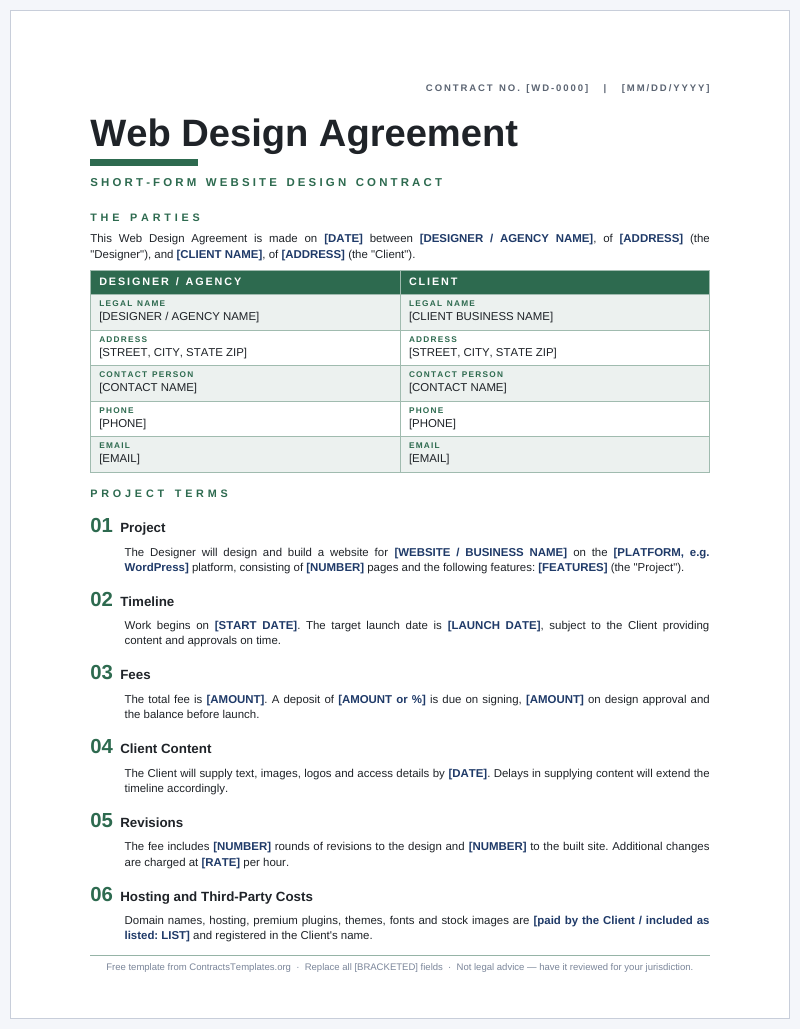
Template 1: One-Page Web Design Agreement
A compact, numbered-clause contract covering scope, timeline, fee, deposit, revisions, client content, ownership and support. Ideal for brochure sites, portfolios and landing pages.
- Single page, quick to complete
- Revision cap and content-delay wording
- IP transfer on final payment
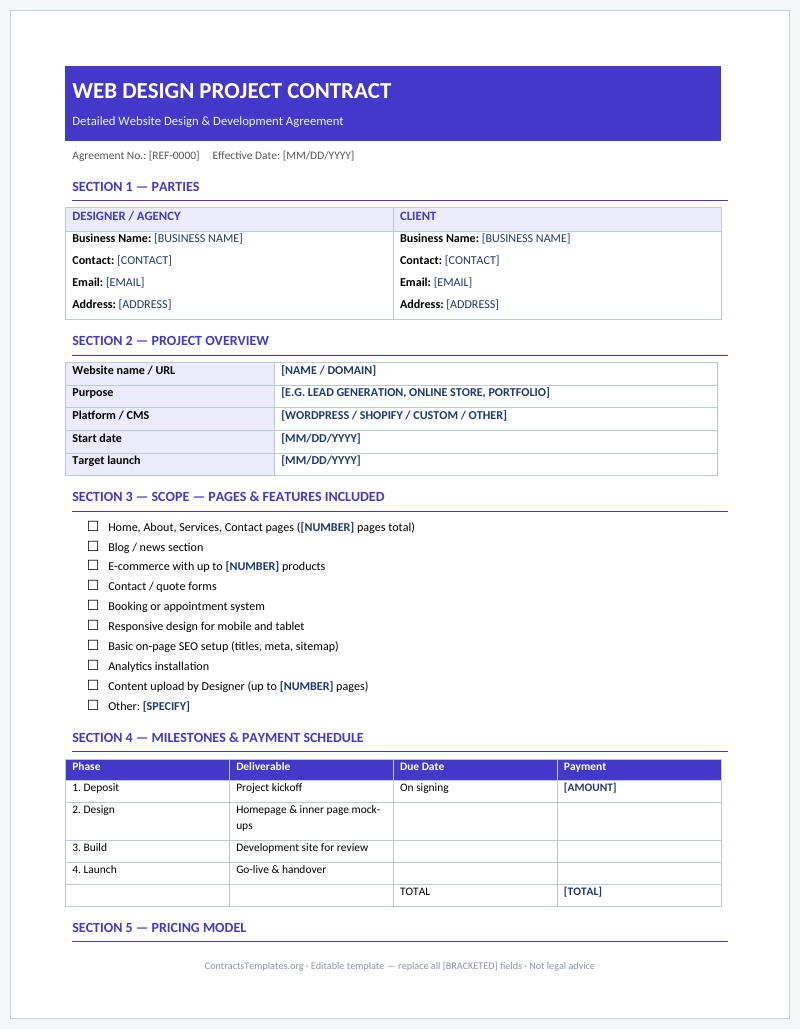
Template 2: Detailed Web Design Project Contract
A form-style contract with a page and feature scope checklist, milestone and payment table, hosting and third-party cost checkboxes, client responsibilities, revision policy and handover checklist.
- Scope checklist for pages and features
- Milestone and payment schedule table
- Hosting, domain and handover sections
When Do You Need a Web Design Contract?
Use a contract for every website project, whether you are the designer or the client. It is particularly important when:
- Building a new business website, online store or portfolio.
- Redesigning an existing site or migrating it to a new platform.
- Creating landing pages for a marketing campaign alongside an advertising contract.
- Working with a client remotely or in another country.
- The project will be paid in stages over several weeks or months.
- Ongoing maintenance, hosting or support will follow the launch.
Key Clauses in a Web Design Contract
Scope of Work
List the number of pages or templates, key features (contact forms, blog, e-commerce, booking system, multilingual support), the platform or content management system, browser and device compatibility and any third-party integrations. Anything not listed is out of scope.
Client Responsibilities
Websites depend on client input. State what the client must provide, such as text, images, logos, brand guidelines, product data and login details, and by when. Explain that delays in supplying content will move the deadline.
Timeline and Milestones
Break the project into phases, such as discovery, design mock-ups, development, content population, testing and launch, with target dates for each.
Revisions and Approvals
Specify how many rounds of revisions are included at each stage and the hourly rate for additional changes. Require written approval at the end of each phase so work does not have to be redone later.
Fees and Payment Schedule
State the total project fee or hourly rate, the deposit and the payment milestones. Many designers take a deposit before starting and the final payment before launch or handover.
Hosting, Domains and Third-Party Costs
Clarify who pays for and owns the domain name, hosting, premium themes, plugins, fonts and stock photos. Registering these in the client’s name avoids access problems later.
Intellectual Property and Portfolio Rights
Typically, ownership of the final design and custom code transfers to the client on full payment, while the designer keeps rights to pre-existing code, frameworks and tools. Designers often reserve the right to show the project in their portfolio.
Warranty, Maintenance and Support
Offer a short post-launch period for fixing bugs, and state whether ongoing updates, backups and security monitoring are included or available under a separate maintenance plan.
Termination
Explain how either party may end the project, what fees are due for work completed and what files are handed over.
Fixed Price vs. Hourly Web Design Contracts
Most web design projects are priced in one of two ways, and the contract should reflect whichever you choose:
- Fixed price: the client pays an agreed total for a clearly defined scope. Clients like the certainty, and designers can earn more by working efficiently. The risk is scope creep, so the contract must list deliverables precisely and include a change-request process.
- Hourly or day rate: the client pays for time spent, often with an estimate and a cap that cannot be exceeded without approval. This suits projects with unclear requirements or ongoing improvements, but it requires time tracking and regular reporting.
Some designers combine both, quoting a fixed price for the core build and an hourly rate for extra requests and post-launch changes. Our detailed template includes checkboxes for each model.
How to Fill In the Web Design Contract Template
- Add designer and client details. Include business names, contacts and addresses.
- Describe the project. Enter the website name, purpose and platform.
- Complete the scope checklist. Tick pages and features included and list anything specifically excluded.
- Set milestones. Enter each phase, deliverable, due date and payment amount.
- Define revisions. Enter the number of revision rounds and the hourly rate for extras.
- List client responsibilities. Enter content deadlines and access details required.
- Clarify hosting and third-party costs. Tick who provides and pays for each item.
- Confirm IP and support terms. Choose when ownership transfers and how long the support period lasts.
- Sign. Both parties sign before work starts.
What to Hand Over When the Website Launches
A smooth handover is one of the best ways to finish a project on good terms, and listing it in the contract avoids last-minute disagreements. At launch, the designer would typically provide:
- Account access: administrator logins for the content management system, hosting control panel, domain registrar and any connected services, with the client set as the account owner.
- Files and assets: final design files, logos, images and fonts licensed for the project, plus any custom code or theme files.
- A full backup: a copy of the website files and database taken at launch, so the client has a clean restore point.
- Documentation: a short guide explaining how to edit pages, add blog posts or products and update plugins.
- Training: an optional walkthrough call so the client’s team can manage day-to-day updates.
The contract should also state when access is transferred, for example once the final invoice is paid, so both sides know exactly what to expect.
Tips and Common Mistakes
- Vague scope. “A modern website” means different things to different people. List pages and features.
- Unlimited revisions. Always cap revision rounds and price extra changes.
- Starting without a deposit. A deposit confirms the client’s commitment.
- Ignoring content delays. Make deadlines dependent on receiving client content on time.
- Holding the domain in the designer’s name. Register domains and hosting accounts to the client to avoid disputes.
- No handover checklist. List logins, files and documentation delivered at launch.
More agreements for creative and digital freelancers are available in the Freelance Contracts category, including our consulting contract template for strategy work.
Frequently Asked Questions
What should a web design contract include?
The parties, project scope, client responsibilities, timeline, revisions, fees and payment schedule, hosting and third-party costs, intellectual property, warranty and support, termination and signatures.
Who owns the website after it is built?
That depends on the contract. Most web design contracts transfer ownership of the final design and custom code to the client once all invoices are paid, while the designer keeps ownership of reusable tools and code libraries.
How many revisions should be included?
There is no fixed rule. Many designers include two or three rounds of revisions per stage. The key is to state the number and the cost of additional rounds.
Should I charge a deposit for web design work?
A deposit is common and protects the designer if the client abandons the project. State the deposit amount and whether it is refundable.
Does the contract cover website maintenance?
Only if you include it. Many designers offer maintenance under a separate monthly agreement. Our detailed template includes an optional support and maintenance section.
Legal Disclaimer
This web design contract template is provided for general information only and is not legal advice. Intellectual property, consumer protection and data privacy rules differ by jurisdiction. Consult a qualified lawyer for advice about your specific project.